How to create a WeChat account and use it
China’s digital ecosystem is built on local platforms: almost every international service has its own Chinese equivalent. You won’t be able to send messages in Telegram, order a taxi through Yandex, or search for a hotel on Google Maps — these services are blocked. All digital activity runs through WeChat: people communicate, pay for purchases, and access services there.
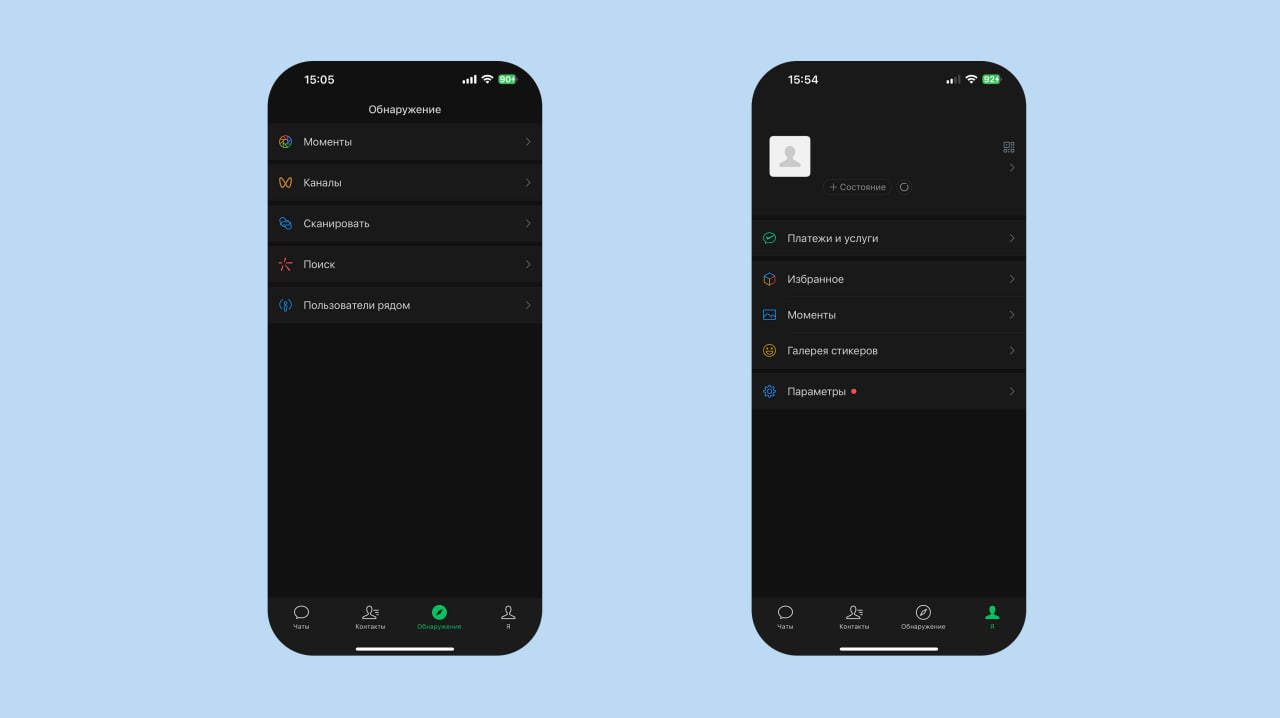
Here’s how to install WeChat, set up your profile, enable payments, and use its built-in features.
What is WeChat
WeChat is an app used in China for communication, payments, and accessing various services. It was developed by Tencent and has become one of the country’s key digital platforms.
WeChat includes:
- chats and voice/video calls
- a personal feed called Moments
- payments through WeChat Pay
- mini-apps for taxis, food delivery, tickets, medical appointments, university services, and more
All core functions work inside the app itself. Most shops, cafés, universities, and services rely on WeChat for both communication and payments.
For foreigners, it’s just as essential as it is for locals — being in China without WeChat is extremely difficult.
How to sign up for WeChat
The signup process starts with installing the app from the App Store or Google Play. After launching it, open the registration page, select your country, and enter your phone number. You’ll receive an SMS code to confirm that the number belongs to you. The app will then ask you to enter your profile name and photo, which you can add later.
After submitting your details, you’ll need to pass a mandatory verification step: WeChat checks that you’re not a robot — this may be a puzzle, matching similar images, or another simple test. At this stage, some users complete the process immediately, and the account moves straight to the first launch.
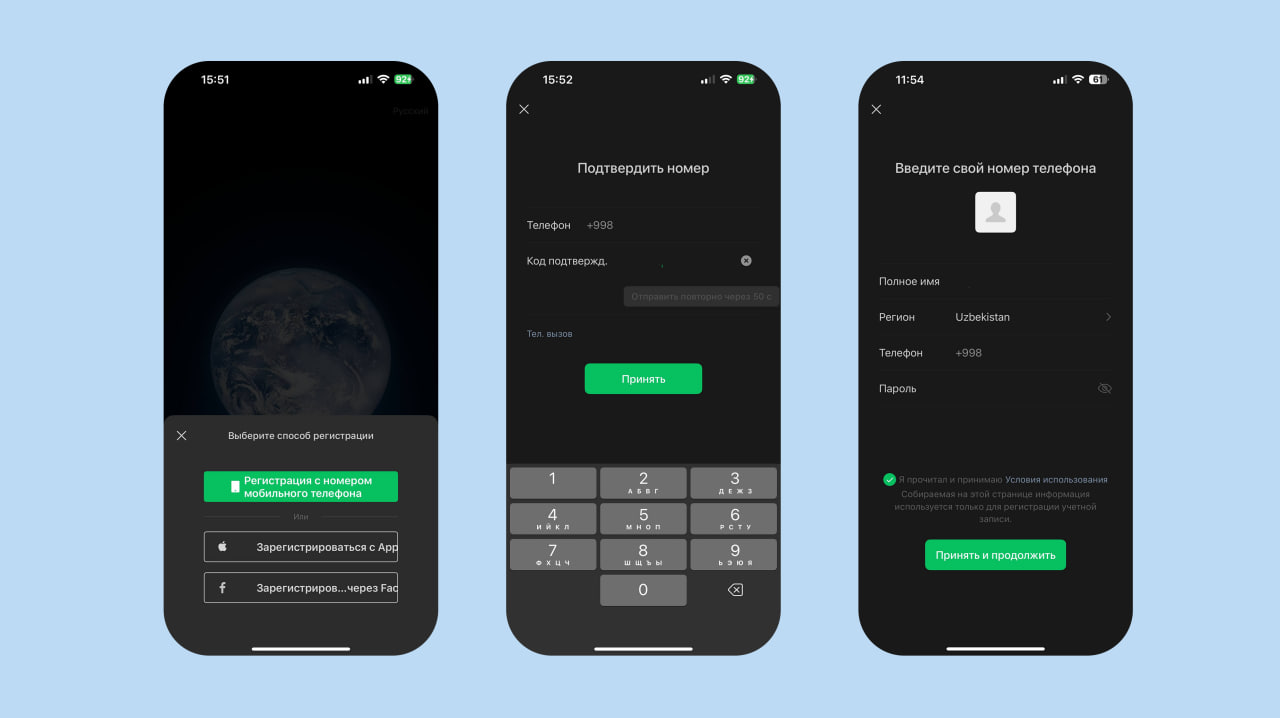
However, when registering outside China, the app often adds an extra security step: WeChat may require “friend verification.” In this case, a QR code will appear, which you need to send to someone with an active WeChat account. They confirm your registration through a special menu, after which your profile is activated.
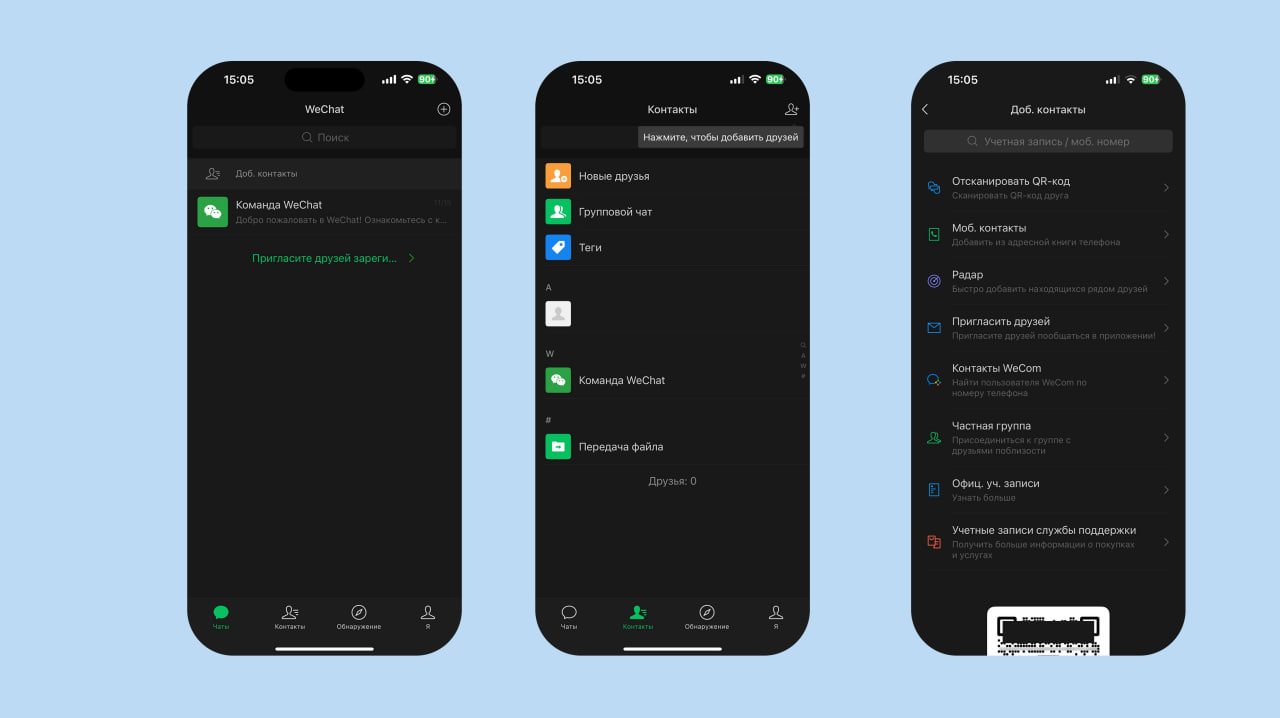
Once all checks are completed, the account is fully unlocked — chats, Moments, and mini-programs become available.
The WeChat Pay payment system is activated separately; its setup is not part of the registration process and requires additional steps.
Main features in WeChat
WeChat includes chats with regular text messages, voice notes, video calls, and group conversations.

There is also a Moments feed, where users share photos and short posts visible only to added contacts.The app has a built-in section with mini-services — everything runs inside WeChat without separate apps, and payments are made through WeChat Pay.
How to enable WeChat Pay
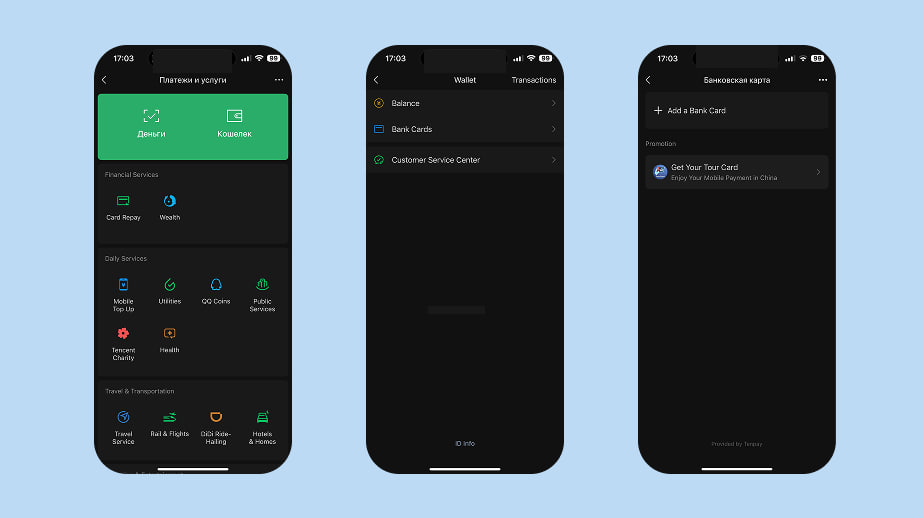
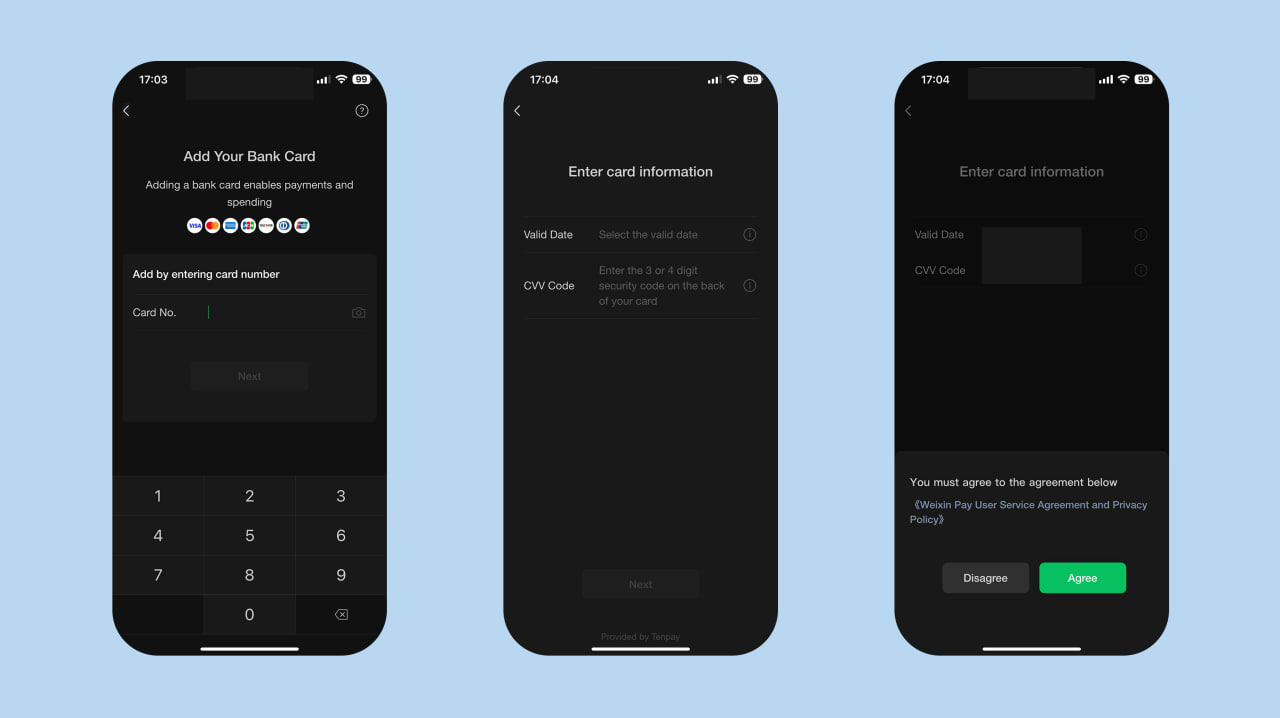
WeChat Pay is activated through the payments menu. Open the Wallet section, select “Add card,” enter your card details, and confirm the operation with an SMS code from your bank. After successful verification, the card will appear in your wallet, and you’ll be able to make QR-code payments and use built-in mini-services.

Mini-programs in WeChat
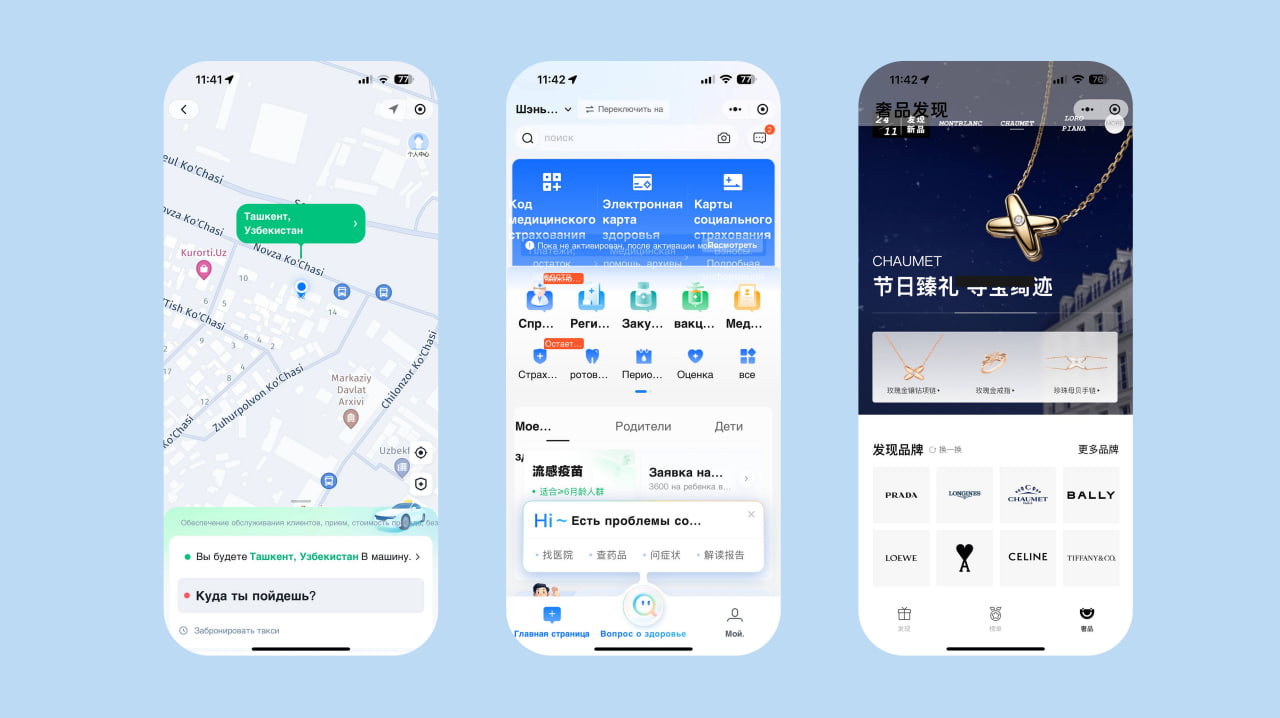
WeChat has built-in mini-services that work like regular apps but run inside WeChat. Most everyday actions are handled through them.
With mini-programs you can order a taxi, get food delivery, buy tickets, open the metro map, pay utility bills, rent a bike, book a doctor’s appointment, or check your class schedule. Universities, shops, banks, transport companies, and government institutions launch their services in the mini-program format, so everything is located in one place.
For foreigners, this is the most convenient way to access Chinese services. Many of them don’t have English-language websites and operate only inside WeChat.
In the Payments and Services section, WeChat shows a list of the most frequently used mini-programs. It may vary by region but usually includes several categories.
- In everyday services: mobile top-ups, utility payments, medical records, Tencent Charity, and in-app game purchases.
- In transport: train and flight tickets, taxi ordering via DiDi, travel services, and hotel search.
In the shopping section: online stores, group purchases, event tickets, sales, and second-hand marketplaces.
Mini-programs don’t need to be downloaded. They open instantly and are saved in history — frequently used ones stay at the top.
Common issues and how to solve them
SMS code doesn’t arrive.
Sometimes messages are blocked by the mobile operator or WeChat’s security system. Make sure the phone number is entered in the correct international format, restart your phone, or temporarily disable your VPN. In some cases, requesting the code again after 10–15 minutes helps.
“Friend verification” appears.
This is a normal security step for registrations made outside China. You need to send your QR code to someone who already has an active WeChat account so they can confirm the request. If you don’t know anyone, you can ask for help in themed chat groups or from the hosting side.
Unable to link a card to WeChat Pay.
In most cases, the issue comes from the bank, not the app: international transactions may be restricted, anti-fraud filters enabled, or the card may not support the Chinese region. Try another card, enable online payments in your mobile banking app, or contact your bank’s support team.
Some mini-programs won’t open.
Certain services work only with Chinese bank cards, local mobile numbers, or regional registration. This is a system limitation, not a phone error. However, most everyday services—taxi, food delivery, tickets, metro—are available for foreigners.
Related News
16:13 / 24.04.2025
WeChat Pay may enter Uzbek market through local system integration
12:59 / 14.04.2025
Uzbekistan aims to link domestic payment systems with Chinese WeChat and Alipay for tourism payments
08:45 / 10.11.2021
Two-hour blockade of social networks cost Uzbekistan at least $2.6 million
20:34 / 26.07.2021