How to pick the right laptop for school and university
|19:18 / 28.04.20265,24110 min
Daily study tasks, from lectures to projects, require a laptop that is reliable and delivers solid performance. To meet these requirements, it is important to consider key specifications.
In this article, we outline the main selection criteria and provide examples of models for different budgets.
What to look for in a laptop for students
Education today relies on digital tools, including video lessons, documents, presentations, and online platforms. A laptop has become the main working device for students, and its performance, battery life, and usability directly affect how efficiently tasks are completed. To avoid slowdowns and handle daily workloads, it is important to understand which specifications matter most and which features are not worth overpaying for.
1. Performance
When choosing a laptop, the processor is the key component. It works like the brain of the device. The more powerful it is, the faster the laptop handles tasks such as opening programs, loading pages, and working with files.
Today, there are two main processor manufacturers:
Intel, an American company with Core i3, i5, i7, and i9 processors
AMD, a competitor with its Ryzen lineup offering similar performance levels
Processors from Intel and Ryzen
How to understand processor lines
The higher the number, the more powerful the processor.
i3 / Ryzen 3 — basic level, suitable for Word, Zoom, and browsing
i7 / Ryzen 7 — more advanced, suitable for heavy programs such as video editing and 3
i9 / Ryzen 9 — not necessary for studying, usually used in gaming laptops and workstations
What “new generation” means
Processors are updated every year. For example, an Intel Core i3 12th generation is faster and more stable than an i3 8th generation. That is why the generation number is often more important than the processor line itself.
If the specifications show Intel Core i5-12450H, the number 12 indicates the generation.
Related topics
For study tasks, it is recommended to choose:
Intel 12th–13th generation or newer
AMD Ryzen 6000 series or newer
newer lines such as Intel Core Ultra, which offer better energy efficiency and longer battery life
Older processors tend to be slower and heat up faster. For comfortable work, both the processor and RAM matter. For basic tasks such as lectures, browsing, documents, and video calls:
8 GB RAM is the minimum
processor i3 or Ryzen 3 and above
Running multiple programs at the same time may cause slowdowns.
For technical and creative tasks such as design, programming, and editing:
16 GB RAM
processor i5 or Ryzen 5 and above
These configurations provide stable performance without lag.
2. Usability and mobility
A laptop for studying should be lightweight, easy to carry, and able to last through the day on battery. Size, display quality, and battery life directly affect everyday comfort.
Size and weight
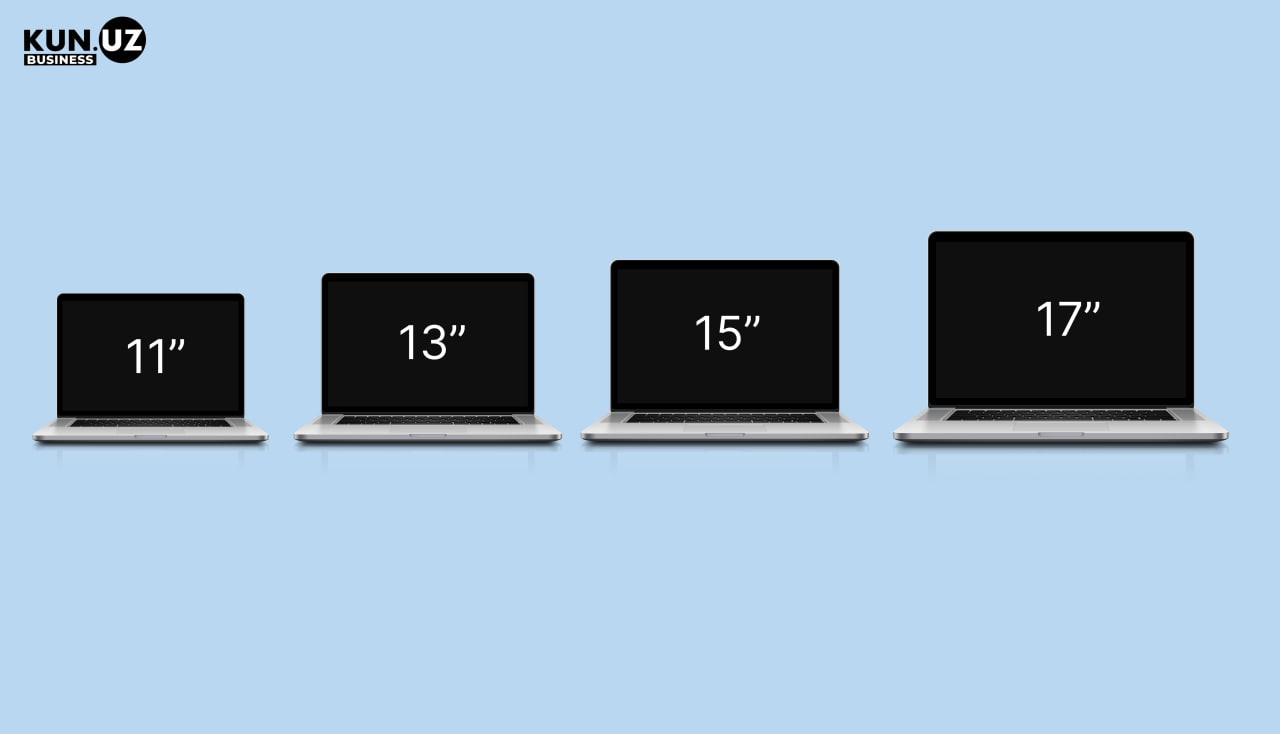
The optimal choice for a student is a 13–14 inch screen and weight up to 1.5 kg. Such a laptop fits easily into a backpack, is comfortable to carry, and does not take up much desk space.
Difference in laptop sizes
Display
The minimum standard is a Full HD (1920×1080) display with an IPS panel. A matte screen helps reduce glare and eye strain during long study sessions.
Display visibility differences
Many students spend 6–8 hours a day in front of a screen. A poor display can lead to headaches and eye fatigue.
Keyboard and touchpad
Coursework, essays, and notes require constant typing, and the keyboard plays a key role in comfort. Backlit keys are useful when working in low light, while a responsive touchpad is important if you often work outside or on the move.
If you plan to type notes or study at night, it is better to choose a laptop with backlit keys.
3. Battery life and charging
Battery life is important for studying, especially if you spend long hours away from a power outlet. A realistic benchmark is 6–8 hours of work in a browser, video calls, and office programs.
In practice, actual battery life is usually lower than advertised. If a laptop claims 10–12 hours, real usage is often closer to 7–8 hours.
Fast charging
If a laptop charges to 50% in one hour, you can get an additional 3–4 hours of usage during a short break.
How to evaluate battery capacity
Battery capacity is measured in watt-hours (Wh). This shows how much energy the battery can store and how long the laptop can run without charging.
For study tasks:
50 Wh and above is enough for 5–7 hours of daily use
70–80 Wh offers higher capacity and can last a full study day under moderate use
The higher the Wh value, the longer the laptop will last in real conditions.
4. Storage and SSD: what to choose
Storage affects both system speed and how удобно работать с файлами. Choosing the right type of drive is essential for smooth performance.
What is SSD and why it matters
SSD is a modern type of storage that has replaced traditional hard drives (HDD). It is much faster: the laptop boots in seconds, programs open instantly, and there is no noise or vibration.
SSD and HDD storage
How much storage a student needs
256 GB is the minimum. It is enough for documents, a browser, a few programs, and basic media files.
512 GB is the optimal choice, allowing you to store more files and work comfortably without worrying about space.
If you plan to use the laptop for several years, it is better to choose 512 GB.
What to avoid
Older laptops with only an HDD are slow, even if other specifications look decent. A newer processor will not solve performance issues if the system is limited by outdated storage.
If a laptop is noisy, takes a long time to start, and slows down when opening folders, it is most likely using an HDD. Such devices are not suitable for studying.
5. Ports and connectivity for students
Study tasks often require connecting headphones, USB drives, projectors, and external displays. That is why it is important for a laptop to have the necessary ports or support a convenient adapter with multiple connections.
Universal laptop adapter
Types of computer cables
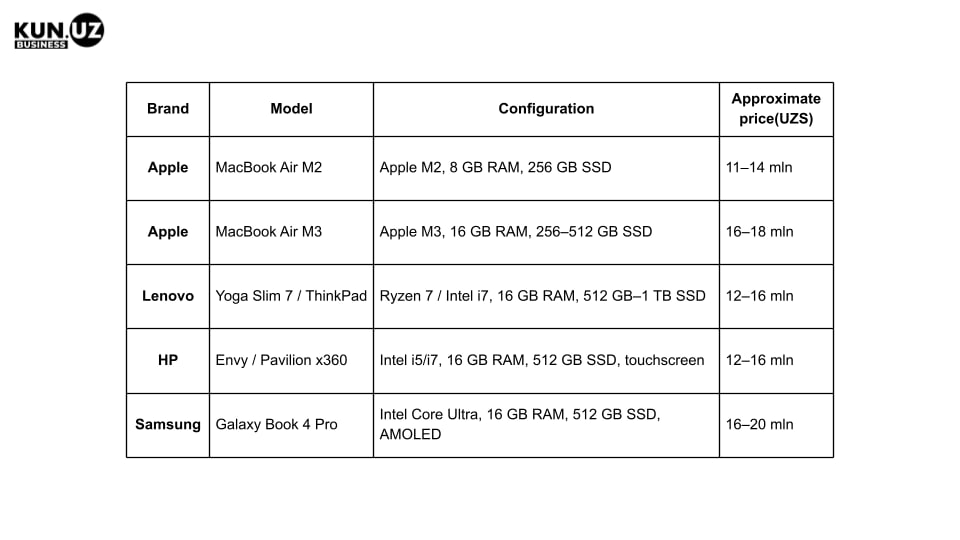
How much a laptop for studying costs
Students who need a laptop for basic academic tasks — documents, online lectures, video calls, browsing.
These models handle everyday tasks but may slow down under heavy multitasking.
Mid-range models
Students working with design, engineering software, programming, or editing.
High-performance devices
For demanding tasks: video editing, 3D modeling, programming, design.
How to choose a used laptop
There are many refurbished and second-hand laptops — typically 30–40% cheaper.
What to check:
Check battery condition.
Inspect the body, keyboard, and screen.
Confirm availability of original charger and OS.
Key takeaways
A gaming laptop is not necessary for studying — it is heavier, noisier, and drains faster.
Focus on processor (i3 / Ryzen 3 and above), 8 GB RAM, and SSD.
Optimal screen — 14–15 inches, weight up to 1.5 kg.
Battery life — at least 6 hours.
Used laptops can be a good option, but only with warranty and proper inspection.